Adding an Academic Calendar
SCU's Office of the Registrar manages the Undergraduate Academic Calendar. Subscribing to this calendar will display the week within the quarter, add/drop deadlines, registration periods, finals schedule, and academic holidays to help you plan and schedule quickly and efficiently.
Calendar Name
SCU Undergraduate Academic Calendar
How To
- Open the Google Calendar Application.
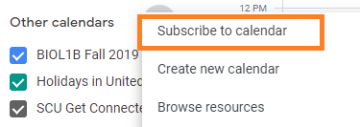
- Click the + sign under "Other calendars" to Subscribe to a Calendar.

- Select "Subscribe to calendar"
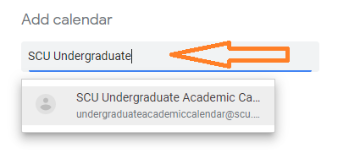
- Type the the name of the Academic Calendar you wish you to add to your Google Calendar (list above).
- The calendar items will now appear in the "All Day" section of your calendar.
- Enjoy.
Examples from the Undergraduate Academic Calendar
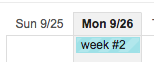
- Keep track of what week it is.
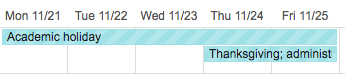
- Schedule family and fun time during academic holidays.
- Keep track of important add/drop/incomplete dates.

- Know when the student registration period is coming up.

- Know when finals week starts and ends.
